How to Run Structured Technical Interviews That Actually Work
On this page
- What Is a Structured Technical Interview?
- Step 1: Build Your Question Bank
- Writing Questions That Actually Test Skill
- Step 2: Create Reusable Interview Templates
- Why Templates Beat Winging It
- Step 3: Conduct the Interview with Live Scoring
- Adding CV-Based Questions on the Fly
- Step 4: Review and Make Data-Driven Decisions
- Comparing Candidates Consistently
- Common Structured Interview Mistakes
- Get Started with Structured Interviews
Most technical interviews are broken. Different interviewers ask different questions, score candidates on gut feeling, and walk out of debriefs saying "I just didn't get a good vibe." The result? Inconsistent hiring decisions, missed talent, and zero data to improve your process. A structured technical interview fixes all of that — and it's simpler than you think.
TL;DR: Structured technical interviews follow a repeatable 4-step process: build a question bank, create reusable templates, conduct interviews with live scoring, and review results with data. This guide walks through each step with practical examples.
What Is a Structured Technical Interview?
A structured interview means every candidate for the same role gets the same questions, evaluated against the same criteria, by interviewers who score responses in real time — not from memory after the fact.
Research backs this up. Google's internal studies found that structured interviews are the strongest predictor of job performance, outperforming years of experience, school prestige, and even work samples. The key insight is that consistency creates fairness, and fairness produces better signal.
The process breaks down into four steps that map directly to how modern interview tools work:
- Build your question bank. Curate questions by category, difficulty, and topic tags.
- Create reusable templates. Bundle questions into role-specific interview plans.
- Conduct with live scoring. Rate each answer in the moment, not after the interview ends.
- Review with data. Use per-category breakdowns and overall scores to make hiring decisions.
Key takeaway: Structure doesn't mean rigid. It means every candidate gets a fair, consistent evaluation — while still leaving room for follow-up questions and conversation.
Step 1: Build Your Question Bank
The foundation of any structured interview tool is a well-organized question library. Instead of scrambling to think of questions five minutes before a call, you maintain a curated set that your whole team can draw from.
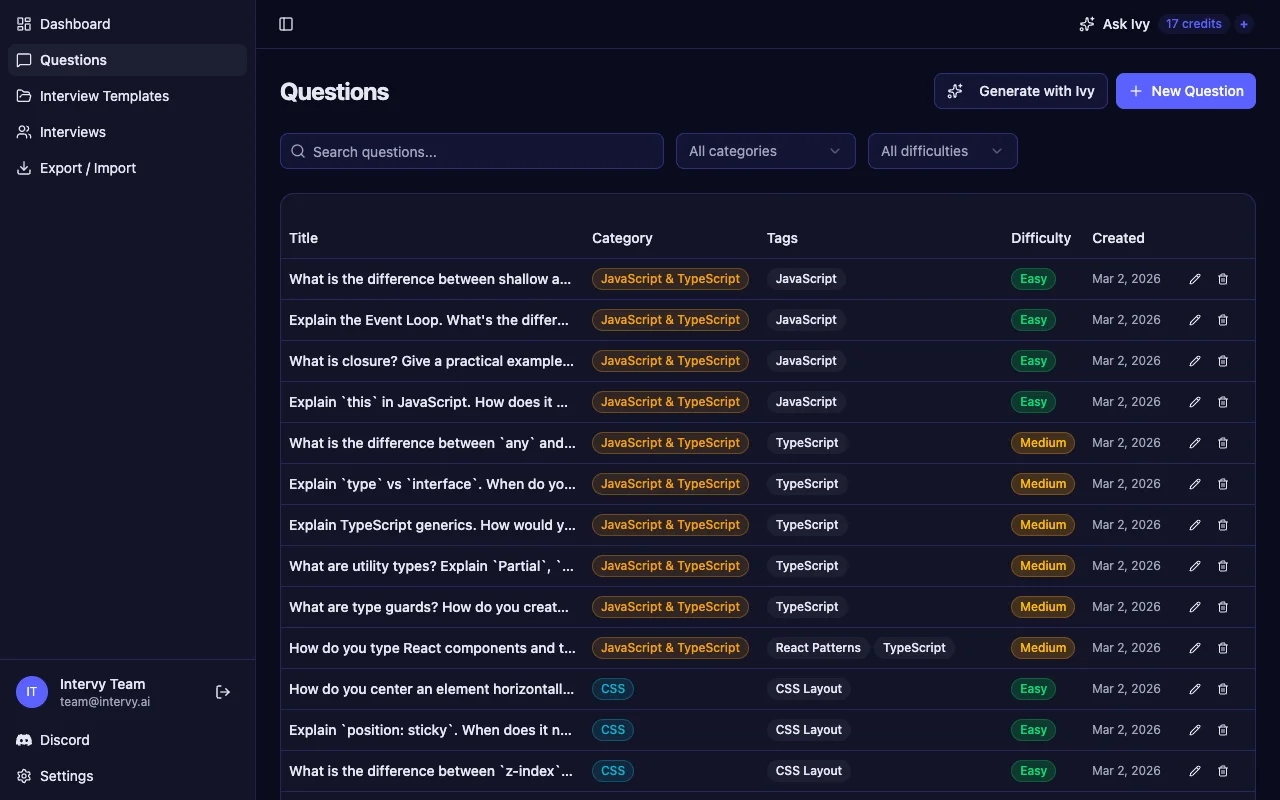
A good question bank organizes questions along three dimensions:
- Categories group questions by domain — JavaScript, CSS, React, System Design, etc. Color-coded labels make it easy to scan at a glance.
- Difficulty levels (easy, medium, hard) let you build interviews that ramp up progressively instead of throwing senior-level questions at every candidate.
- Tags add cross-cutting labels like "React Hooks," "Optimization," or "Security" so you can filter by specific topics regardless of category.
Writing Questions That Actually Test Skill
Each question should include a reference answer — not to expect a word-for-word match, but to give interviewers a clear baseline for what "good" looks like. This is especially important when different team members conduct interviews. Without a shared rubric, one interviewer's "Strong Yes" might be another's "Maybe."
Tip: Include follow-up prompts with each question. A candidate who nails the initial answer can be pushed deeper, while someone who struggles gets a fair chance to show partial understanding. Follow-ups also reduce the temptation to go off-script entirely.
Step 2: Create Reusable Interview Templates
Once your question bank is populated, the next step is bundling questions into templates — structured interview plans that can be reused across candidates for the same role.
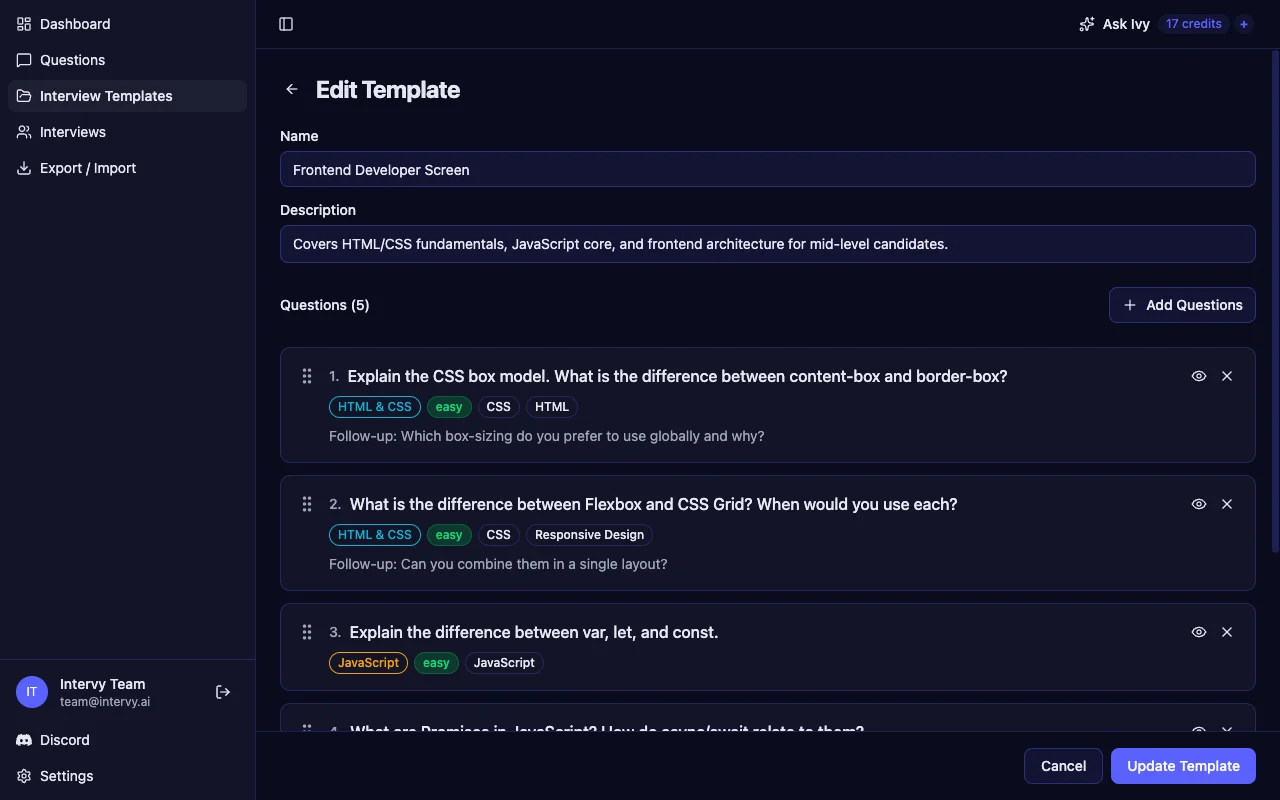
An interview template builder lets you define the exact sequence of questions, ordered from warm-up to advanced. Each template includes:
- A name and description — e.g., "Frontend Developer Screen: covers HTML/CSS fundamentals, JavaScript core, and frontend architecture for mid-level candidates."
- Ordered questions with drag-and-drop reordering, so you can control the interview flow.
- Metadata per question — category, difficulty, tags, and follow-up prompts visible at a glance.
Why Templates Beat Winging It
Templates solve the single biggest problem in technical hiring: inconsistency. When two candidates interview for the same role but get completely different questions, you can't meaningfully compare their performance. Templates guarantee that comparison is always apples-to-apples.
They also save time. Instead of building a fresh question set for every interview, you duplicate an existing template, tweak it for the specific role, and go. A senior frontend template might share 60% of its questions with a mid-level one, with harder follow-ups swapped in.
Key takeaway: One template per role, iterated over time. As your team learns which questions produce the best signal, you refine the template — and every future candidate benefits from that learning.
Step 3: Conduct the Interview with Live Scoring
This is where structure meets reality. During the interview, you work through the template question by question, scoring each answer in real time using a consistent rating scale.
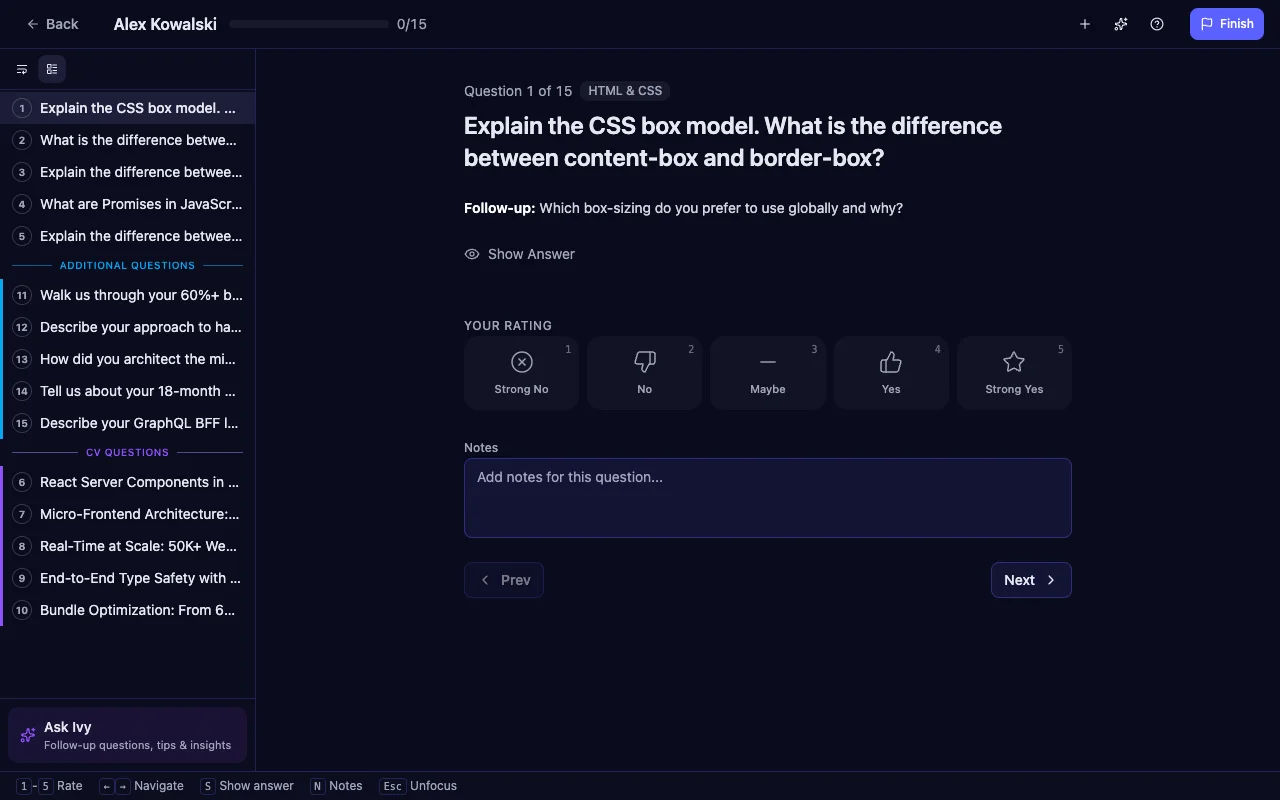
A well-designed technical interview platform gives you everything on one screen:
- Question sidebar listing all template questions plus any added during the session, grouped by source (template questions, additional questions, CV-based questions).
- 5-point rating scale — Strong No, No, Maybe, Yes, Strong Yes — with keyboard shortcuts (1-5) for fast scoring.
- Per-question notes to capture specific things the candidate said, code they wrote, or clarifications they needed.
- Reference answers hidden by default but one click away, so you can calibrate on the fly.
Adding CV-Based Questions on the Fly
One of the most powerful features in a structured process is the ability to generate targeted questions from a candidate's resume. Upload a CV during the interview, and AI analyzes the candidate's specific claims — "reduced bundle size by 60%," "handled 50K concurrent connections" — and generates probing follow-up questions.
These CV questions appear in a separate section of the sidebar, clearly marked so you know they're personalized. This gives you the best of both worlds: a structured base template for fair comparison, plus tailored deep-dives into each candidate's unique experience.
Tip: Rate every answer immediately, not after the interview ends. Memory degrades fast — studies show that post-interview recall is significantly less accurate than real-time assessment. The 5-point scale takes two seconds to click; your future self will thank you during the debrief.
Step 4: Review and Make Data-Driven Decisions
After the interview, the review page turns your ratings and notes into actionable data. This is where structured interviews pay off — instead of debating feelings, your team discusses numbers.
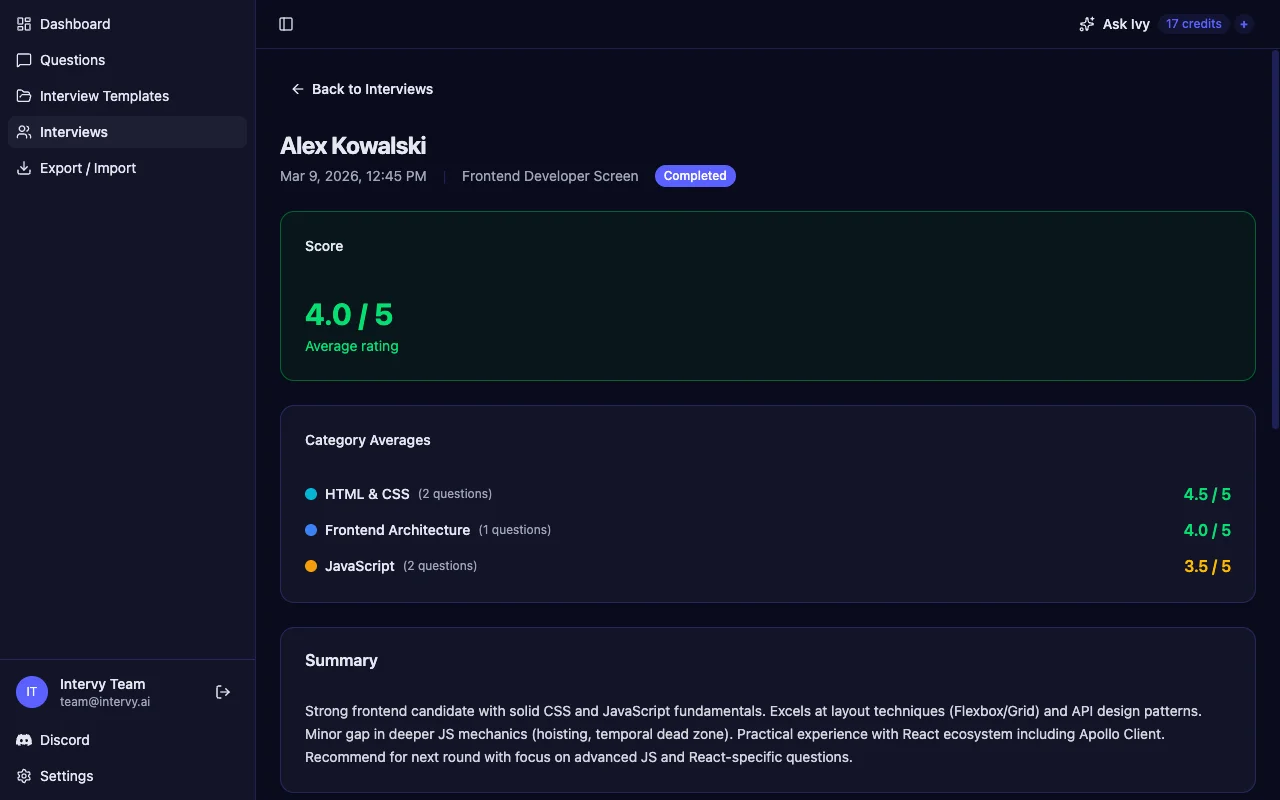
The interview scoring tool provides three levels of insight:
- Overall score — the average rating across all questions, displayed as X / 5. This gives you a quick at-a-glance assessment.
- Category averages — per-domain breakdowns showing where the candidate excelled and where they struggled. A candidate might score 4.5/5 on HTML & CSS but only 3.5/5 on JavaScript, telling you exactly what to probe in the next round.
- AI-generated summary — a concise 2-3 paragraph narrative synthesizing the ratings, notes, and patterns across the interview. This saves time when writing up feedback for the hiring committee.
Comparing Candidates Consistently
When every candidate for a role goes through the same template with the same scoring criteria, comparison becomes straightforward. You're not trying to remember who "seemed stronger" — you have category-level data showing that Candidate A scored 4.5 on system design while Candidate B scored 3.0.
This data-driven approach also helps identify interviewer calibration issues. If one interviewer consistently rates 2 points higher than another, the scores make that visible — something gut-feel interviews can never surface.
Key takeaway: The review isn't just about individual candidates. Over time, interview data reveals which questions produce the best hiring signal, which categories matter most for role success, and which interviewers need calibration.
Common Structured Interview Mistakes
Even with a solid framework, teams make predictable mistakes. Here are the three most common:
- Using templates but not updating them. A template created six months ago may include questions that no longer reflect your tech stack or role requirements. Review templates quarterly and retire questions that have become stale or too well-known.
- Rating after the interview instead of during. This defeats the entire purpose of structured scoring. By the time you sit down to fill in ratings, you've already started constructing a narrative about the candidate. Rate in real time — it's more accurate and takes less total time.
- Ignoring category-level scores. An overall 3.8/5 looks decent, but if the candidate scored 5/5 on easy questions and 2/5 on hard ones, the average masks a real skill gap. Always drill into per-category breakdowns before making a hire/no-hire decision.
Tip: Run a calibration session before your first structured interviews. Have two interviewers independently score the same mock candidate, then compare. The gaps will surprise you — and closing them before real interviews begin is much easier than fixing them after.
Get Started with Structured Interviews
You don't need a massive process overhaul to start interviewing better. Begin with one role: build a question bank of 15-20 questions, create a template that selects 5-7 of them, and run your next two interviews using the structured format. Compare the experience to your previous approach — the difference in clarity and confidence will be immediate.
Intervy is built around exactly this workflow. Your question bank, interview template builder, live scoring, and review dashboard are all connected — so the process described in this guide is the product. Try it with your next technical interview and see how much better hiring decisions feel when they're backed by data.
For more on crafting effective questions, check out our guide on how to prepare for technical interviews with AI. And if you're building a frontend question bank, our React interview questions collection is a great starting point.