Calibrating Your Hiring Bar: What "Senior" Actually Means
On this page
- Why "Senior" Means Something Different on Every Team
- The Cost of an Undefined Bar
- Anchor the Definition in a Competency × Level Matrix
- One Cell, One Written Guideline
- When a Cell Doesn't Apply, Say So
- Calibrate Before You Interview, Not After
- Who Gets to Edit the Bar
- Make the Rubric Visible to Every Interviewer
- One Position, One (Role, Level) Pair
- From Position to Scorecard
- Layer Gates Re-Evaluate the Bar at Every Stage
- When Promotion Criteria and Hiring Criteria Diverge
- Re-Calibrating When the Bar Drifts
- Getting Started
Three Senior Account Executive offers go out the same quarter. One closes deals under €50K; one runs multi-region procurement against legal; one babysits renewals. Same title, same level — and the candidates have no idea their definitions of "Senior" don't overlap. Calibrating the hiring bar is the work of making sure that doesn't happen again.
TL;DR: "Senior" is a level, not a job. To calibrate the hiring bar, write one guideline per competency × level cell, lock that matrix before interviews start, and let the position's chosen level pull the right rubric into every scorecard automatically.
Why "Senior" Means Something Different on Every Team
Ask five hiring managers what Senior means in their function. You will get five sincere answers. A Senior PMM picks the narrative — not just the asset. A Senior CSM de-escalates churn risk without escalating it. A Senior PM frames the problem before negotiating the spec. A Senior AE owns multi-stakeholder negotiation end-to-end. A Senior backend engineer owns the reliability of a system, not the count of merged PRs.
Each of those sentences is a hiring bar in disguise. The problem is they live in different heads, get rephrased in different debriefs, and quietly drift as the company hires more people who "felt Senior in the room."
Key takeaway: When the hiring bar is implicit, you are not hiring against one definition of Senior — you are hiring against as many definitions as you have interviewers.
The Cost of an Undefined Bar
The visible damage is inconsistent offers and salary bands that stop meaning anything. The invisible damage is worse: level inflation creeps in, promotion conversations stall without a shared artifact to point at, and bad-hire post-mortems devolve into "we should have caught that" without saying what "that" was.
This is a calibration problem, not a sourcing problem — exactly what a structured interview tool is built to solve, by forcing the definition out of people's heads into a shared, editable rubric.
Anchor the Definition in a Competency × Level Matrix
The cleanest way to write down a hiring bar is a grid. Competencies are the rows — the things you actually evaluate. Levels are the columns — Junior, Mid, Senior, Lead, Expert. Each cell holds one short, written guideline describing what that competency looks like at that level for that role.
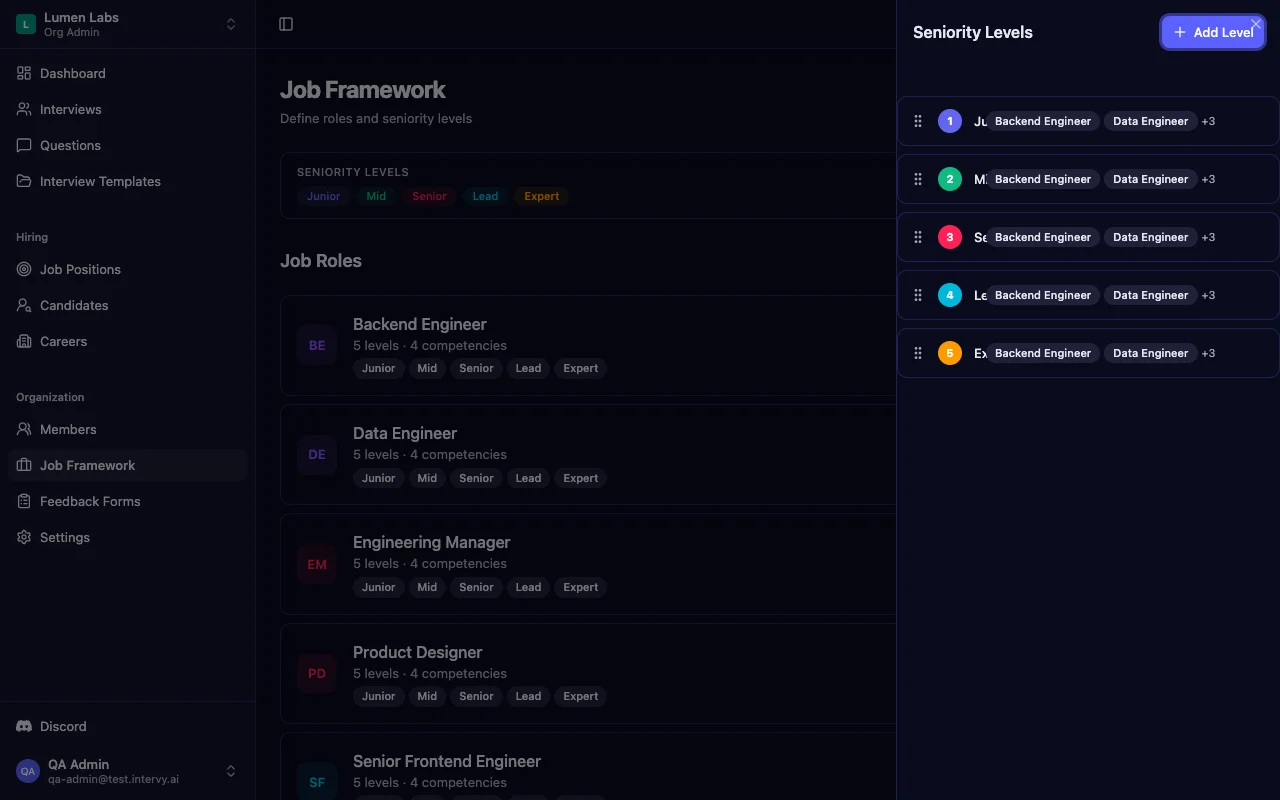
In Intervy, the five default levels — Junior, Mid, Senior, Lead, Expert — live at the organization scope, not the role scope. The single row called "Senior" is the same Senior every job role attaches to, whether Account Executive, CSM, PM, or Backend Engineer. One canonical level, one name, one place to edit.
One Cell, One Written Guideline
Inside a job role, the matrix lives at Job Framework → Job Role → Competency Matrix. Each cell is editable on its own — click "Senior × Negotiation" and write the guideline for that intersection. Edit the cell twice and you overwrite the same row; no duplicate, no version churn.
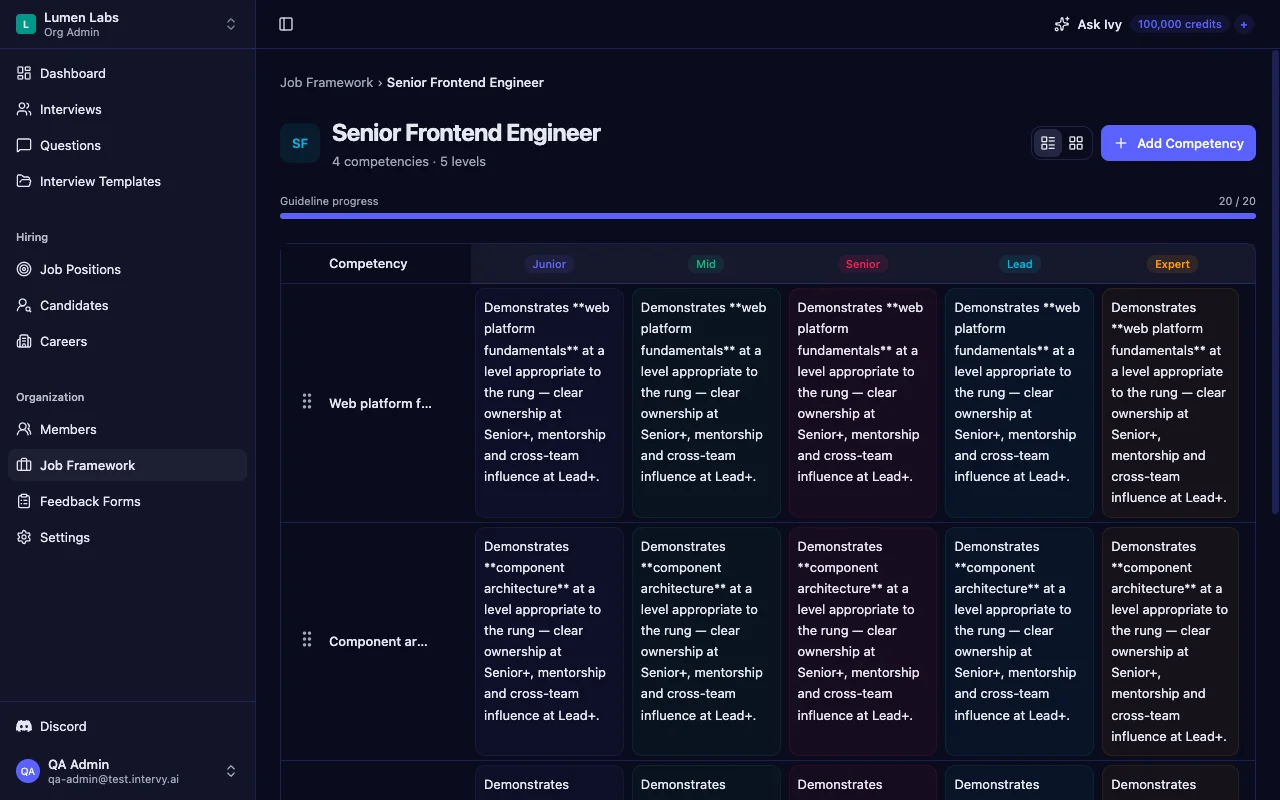
Worked example — sales role, competency "Negotiation":
- Junior. Runs discovery from a script. Hands off pricing to a manager.
- Mid. Owns single-stakeholder negotiations on standard pricing. Escalates legal red lines.
- Senior. Owns multi-stakeholder negotiations end-to-end, including procurement and legal. Pushes back on red lines with prepared rationale.
- Lead. Coaches AEs through their first procurement deals; ghost-writes counter-proposals.
Four cells, each a single paragraph. A full role matrix might be 25 cells, and once written, every interviewer reads from the same rubric instead of inventing one on the fly. That single act — writing the bar down — is what a calibrated structured interview tool is for.
When a Cell Doesn't Apply, Say So
Some cells don't have expectations. A Senior CSM isn't expected to author RFCs. A Junior PMM isn't expected to negotiate vendor contracts. Forcing a guideline into those cells creates a fake bar nobody enforces — worse than no bar at all.
Tip: Mark cells "Not applicable at this level" explicitly. A struck-through N/A in the grid is a visible signal that the cell was a decision, not an oversight. Empty cells get re-litigated in every debrief; explicit N/As don't.
Calibrate Before You Interview, Not After
The most expensive moment in any hiring process is the offer-stage debrief where two interviewers realize they were grading against different definitions of Senior. That conversation costs a candidate, a pipeline slot, and trust on the panel. Calibration is the work of having that conversation before the first interview goes out, not after the fifth.
Calibration is a human conversation between heads of department, HR business partners, and the people who will sit on panels. The product makes the meeting cheaper:
- Read the matrix row by row. Does every head agree the Senior row reads the same way? If not, edit it on the spot.
- Mark unclear cells N/A. A guideline you can't defend in a room of peers won't survive contact with a real candidate.
- Lock the bar before the first req goes live. Editing mid-funnel invalidates the calibration; do it once, before interviewing starts.
Key takeaway: Calibration is a meeting you run once before the funnel opens. The matrix is the artifact you bring into that meeting and edit live.
Who Gets to Edit the Bar
A common failure mode: an interviewer disagrees with a guideline mid-interview and "interprets it loosely." The next interviewer does the same. Within a quarter, the written bar and the actual bar have diverged.
Intervy gates matrix editing behind explicit permissions — competencies:create, competencies:update, levels:create, levels:update. Org Admin and HR business partner roles carry those permissions; interviewers do not. The bar stays where heads of department put it.
Make the Rubric Visible to Every Interviewer
Writing the bar down is half the work. The other half is making sure the interviewer sitting in front of the candidate actually sees it — without having to remember which version applies.
One Position, One (Role, Level) Pair
Every job position in Intervy is anchored on two required fields: a job role and a level. There is no way to open a req without naming both. That pair pulls the right slice of the matrix into the candidate's scorecard later.
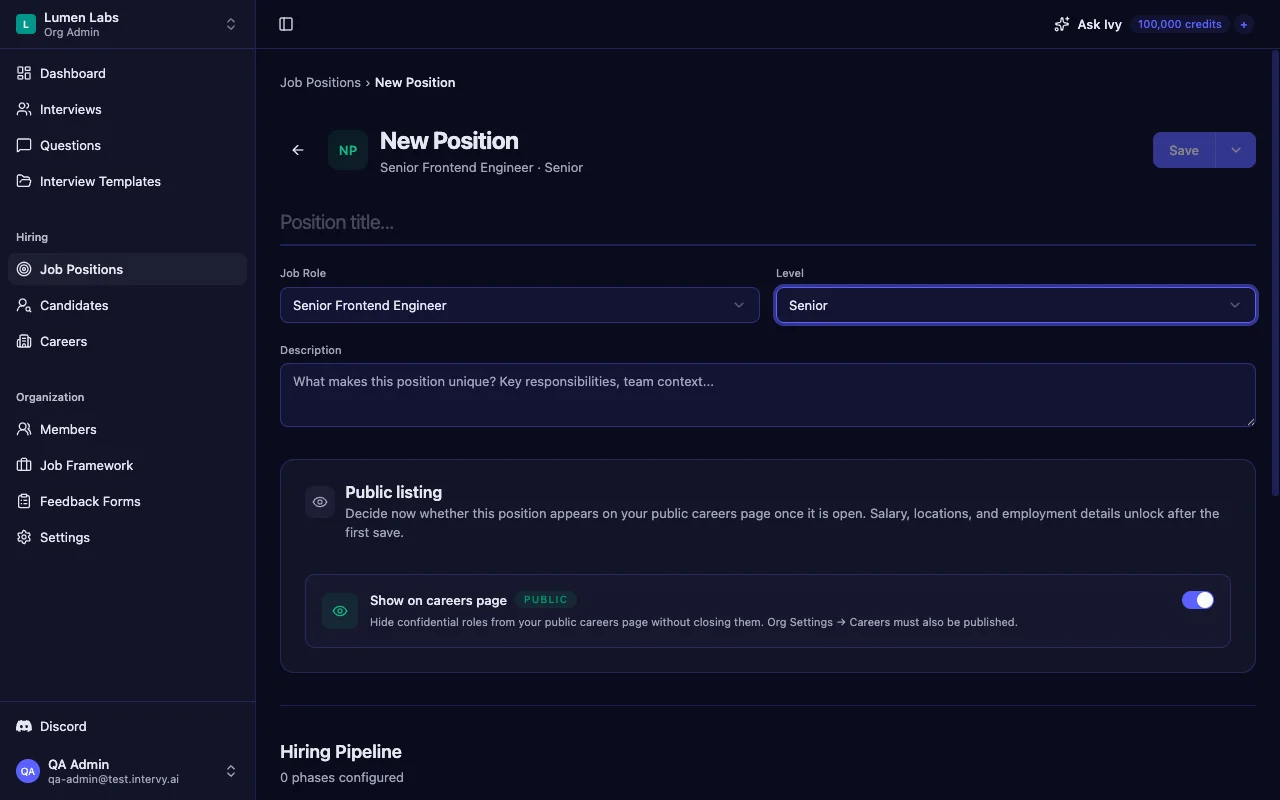
Validation confirms both the role and level exist inside your organization before the position can be created. No way to point a Senior AE req at a Mid-level rubric by mistake.
From Position to Scorecard
At interview time, the scorecard loads exactly the cells of the matrix that match the position's level. The Negotiation guideline next to the panel's average rating is the Senior one — because the position picked Senior — not whatever the interviewer last remembered. If the position were Mid, the same scorecard would render the Mid row instead.
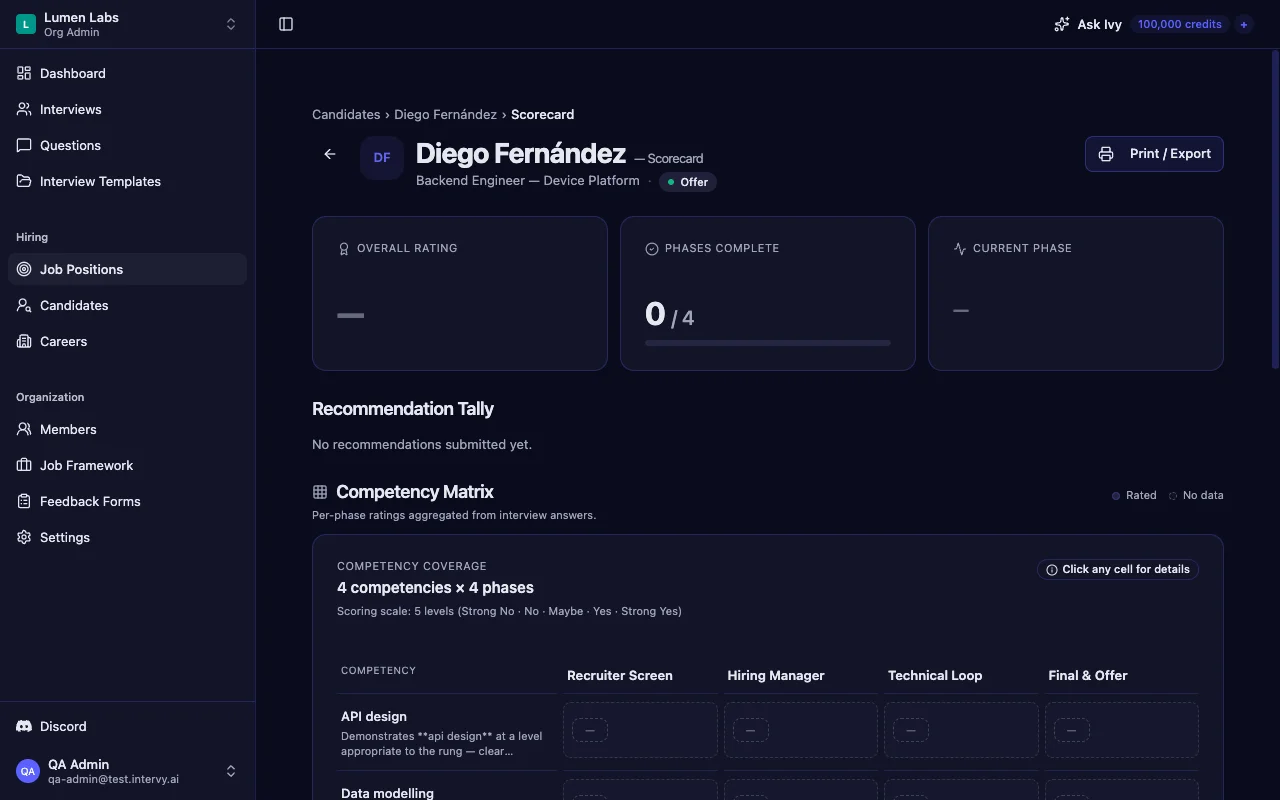
That's the closed loop: heads of department write the bar, the position pins the level, the scorecard reads matched cells back. The interview scoring tool isn't a separate artifact from the rubric — it's the same rubric, rendered at scoring time.
Layer Gates Re-Evaluate the Bar at Every Stage
A pipeline isn't one interview; it's a sequence of phases grouped into layers. Intervy enforces that all phases in layer N reach completed or skipped before any phase in layer N+1 can be scheduled. That gate is the moment the panel re-evaluates against the bar — not just at offer time, but at every layer transition.
Tip: Use layer transitions as natural calibration checkpoints. If two candidates pass layer 1 but their layer-1 scorecards read very differently, you have a calibration drift signal before you've invested in a layer-2 interview.
When Promotion Criteria and Hiring Criteria Diverge
A reasonable question once the matrix exists: can we use it for promotions too? The short answer is yes as a starting point, and no as a single artifact. Conflating the two is how organizations end up promoting people they wouldn't hire.
The hiring bar answers: "Would we hire this person at Senior today, given two to four hours of interviews?" It's a snapshot — evidence from a structured panel, not a year of performance.
The promotion bar answers: "Has this person consistently performed above the Senior bar in role for long enough that we should re-level them?" That's a quarter-by-quarter pattern, not a snapshot. It pulls from performance data, peer feedback, and stretch-project outcomes — sources the panel never sees.
Key takeaway: The same matrix can inform both conversations, but they are separate artifacts. Intervy covers the hiring bar specifically — promotion workflows are not part of the product.
The two bars often have different ceilings. A Senior AE candidate who clears the hiring bar today might still need eighteen months in seat before they'd clear the promotion bar to Lead. Writing them as separate artifacts prevents the slow drift where new hires assume they're a quarter away from Lead because nobody explained the gap.
Re-Calibrating When the Bar Drifts
The bar is a living artifact. Markets shift, the company matures, the kind of Senior you can attract at one comp band changes — and the rubric needs to keep up. Re-calibration is a quarterly cadence, not a one-time setup.
Signals the bar has drifted:
- Too many Strong Yes ratings at one level, too few at another. If 80% of Senior candidates clear the bar, the bar is probably too low. If 5% do, too high.
- Offer rates that diverge sharply by interviewer. Same role, same level, wildly different yield rates — that's a calibration gap, not a candidate-quality gap.
- Recurring debrief disagreements on one cell. If the panel keeps re-litigating "what counts as Senior Negotiation," the cell is under-written. Re-edit it.
Cells are idempotent — editing a guideline overwrites the same row, no duplicate created. Past interviews keep their original ratings; you're not retroactively re-scoring anyone. The new guideline applies to interviews that load the matrix after the edit. Past hires were hired against the bar that existed then; future hires against the bar that exists now.
Tip: Run a quarterly matrix review the way you'd run a sprint retro. Three questions: which cells were debated this quarter, which produced no signal, which need new examples. Edit those; leave the rest alone.
Getting Started
A minimum viable calibration:
- Pick one role. Don't try to do the whole org in one sitting.
- Write five competencies. Fill in the five-by-five grid — N/As are fine for cells you can't defend yet.
- Run one calibration meeting with the people who'll interview against it. Edit cells live.
- Open the first req with role and level pinned, and watch what the scorecard renders next to each rating.
Most teams find the act of writing the matrix surfaces the disagreements they thought were resolved — where they can be settled with a sentence edit instead of a re-hire.
Intervy ships with Job Framework → Job Role → Competency Matrix as a first-class surface, plus the position → scorecard wiring that pulls the right level's rubric into every interview. It works the same way for Senior AE, Senior CSM, Senior PM, or Senior backend — the framework is genuinely role-agnostic. For the broader four-step view of structured interviewing — writing the bar is step one — read our guide to structured technical interviews. Our walkthrough of preparing for technical interviews with AI covers the interview preparation app for hiring managers workflow end-to-end — a companion to any candidate screening tool you're already running.