The 15-Minute Interview Preparation Routine That Works
On this page
- Why 15 Minutes Is Enough (and Zero Minutes Is Not)
- Minutes 0-2: Read the Role Brief and Phase Guidance
- Minutes 2-5: Scan the CV and Mark Three Things to Probe
- Minutes 5-9: Pull the Right Interview Template — Don't Freestyle
- Minutes 9-12: Lock Your Scoring Rubric Before You Hear an Answer
- Minutes 12-15: Pre-Load Two Follow-Ups from the CV
- What NOT to Do in the 15 Minutes
- Make the Routine Your Default
Most bad hires don't start in the interview. They start in the 15 minutes before it — the pre-call window where you skim a CV in a Slack tab, can't remember what phase of the loop you're running, and decide to "just have a conversation." A real interview preparation routine fixes that. It doesn't need two hours. It needs fifteen minutes and a clock.
TL;DR: A repeatable interview preparation routine in five timed checkpoints — read the role brief, scan the CV for three things to probe, pull the right template, lock your scoring rubric, and pre-load two CV-specific follow-ups. Works for sales, customer success, product, and engineering interviews equally.
Why 15 Minutes Is Enough (and Zero Minutes Is Not)
Structured interviews are the strongest single predictor of on-the-job performance — Google's internal research found that structure outperforms experience, school prestige, and even work samples. The point isn't to make interviews longer. It's to make the prep window before each interview deliberate.
Whether you're a sales manager screening AEs, a CS lead phone-screening for empathy, a PM lead running product-sense rounds, or an engineering lead on a panel, the shape of the prep is the same. Five checkpoints. Fifteen minutes total. You can run this between back-to-back Zooms.
Here's the clock:
- Minutes 0-2. Read the role brief and the phase guidance.
- Minutes 2-5. Scan the CV and mark three things to probe.
- Minutes 5-9. Pull the right interview template — don't freestyle.
- Minutes 9-12. Lock your scoring rubric before you hear an answer.
- Minutes 12-15. Pre-load two follow-ups from the CV.
Key takeaway: A 15-minute routine isn't about cramming. It's about removing the four or five decisions you'd otherwise make under time pressure mid-call.
Minutes 0-2: Read the Role Brief and Phase Guidance
The first two minutes aren't about the candidate. They're about you remembering what you're testing in this phase of the pipeline. Sales loops have a discovery-skills phase that isn't the closing-skills phase. Engineering loops have a system-design round that isn't a coding round. CS loops have a stakeholder-empathy phase that isn't a retention-tactics phase. Mixing them up is the cleanest way to ask the wrong question for thirty minutes.
If you've structured your hiring pipeline around phases, each phase should carry a short instruction block for the interviewer — what to test, what to skip, what the previous interviewer covered.
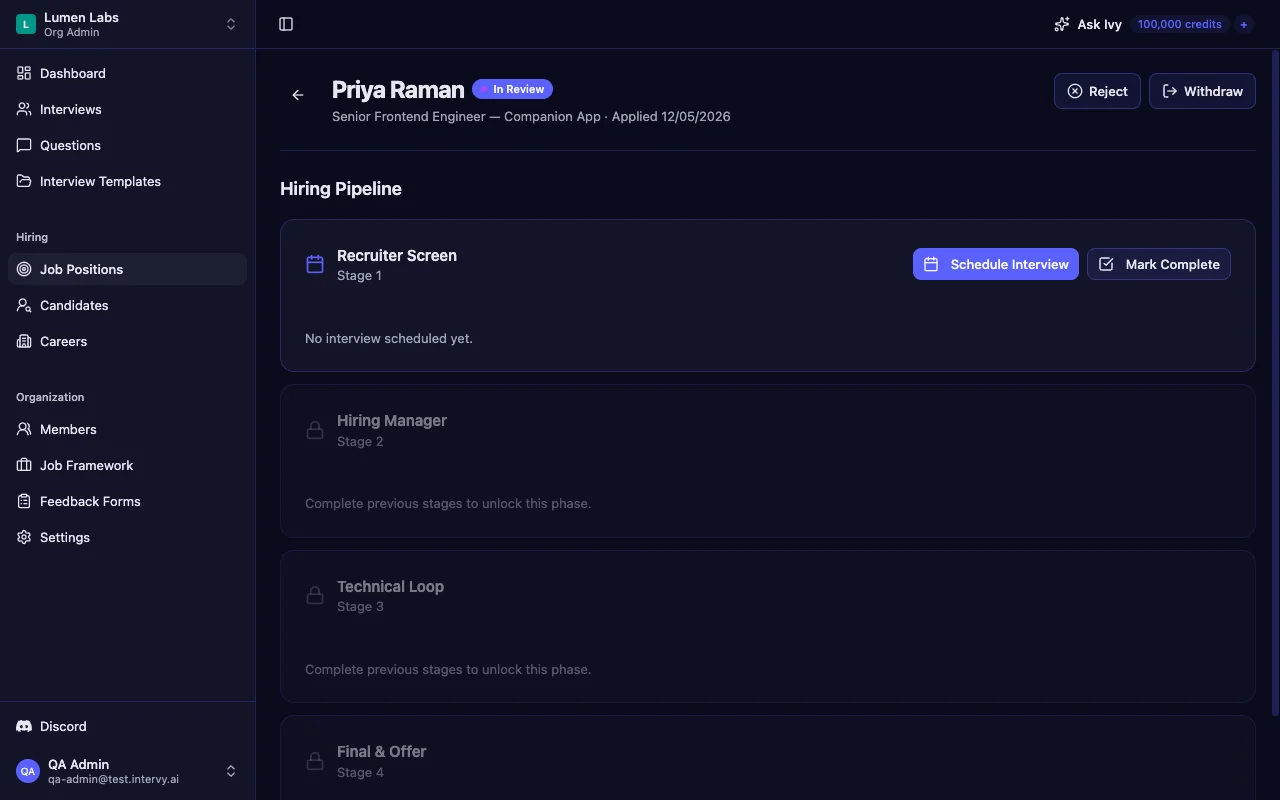
In Intervy, every position phase has a guidance field that interviewers can read inline on the application page — inside the phase card itself. You don't dig back through the job description; the per-phase brief is one collapsible click away.
Tip: If your role brief and phase guidance live in three different docs, consolidate them once. Minute 0 is for information, not search.
Minutes 2-5: Scan the CV and Mark Three Things to Probe
Three minutes to scan a CV is plenty — but only if you stop trying to read it cover to cover. The trick is to mark exactly three things and move on:
- One claim that sounds inflated. A sales rep's "150% of quota for four consecutive quarters." A CS lead's "reduced logo churn by 30%." A PM's "shipped to 50K users." Don't dismiss it — flag it as worth probing.
- One gap or pivot. A six-month hole between roles. A jump from engineering to product. An industry switch. Not red flags — just questions worth one minute of the conversation.
- One strong signal worth deepening. Something that maps to the competency you're hiring for. Go deep on it instead of breadth-checking every line of the resume.
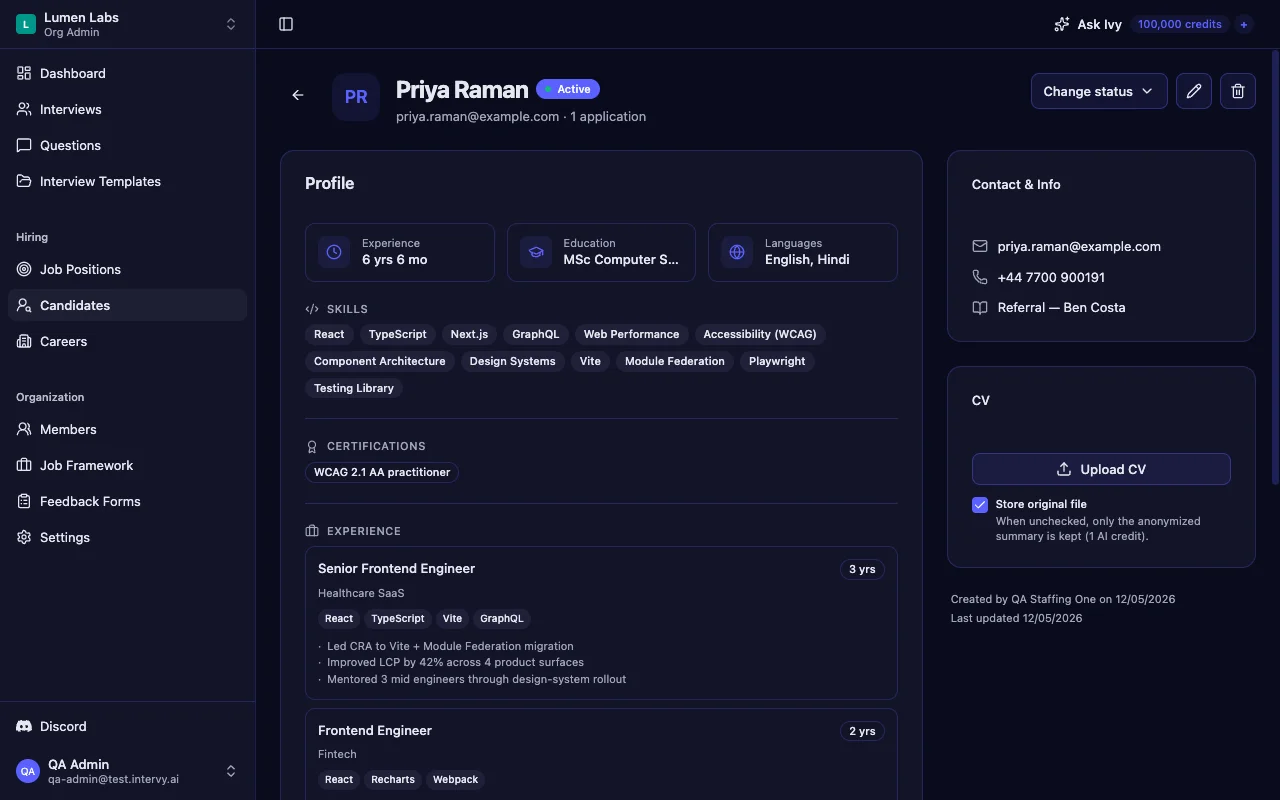
This step is faster when you're not opening a PDF. Intervy stores each candidate's CV as an anonymized, structured profile on the candidate's detail page (open it from your candidates list) — skills, languages, certifications, and per-role experience with periods, responsibilities, and technologies broken into scannable sections. PII (names, emails, phones, birth dates) is stripped at upload, and company names are replaced with industry descriptors — so you scan in roughly 90 seconds without forming bias from a brand-name employer.
Tip: Write your three probes down before the call starts. The act of writing them — not just noticing them — is what stops you forgetting two of them the moment the candidate joins.
Minutes 5-9: Pull the Right Interview Template — Don't Freestyle
This is the four-minute checkpoint where most bad interviews are decided. "Winging it" with different questions for different candidates is the biggest source of inconsistent hiring — you can't compare two AEs, two PMs, or two engineers if they answered different questions.
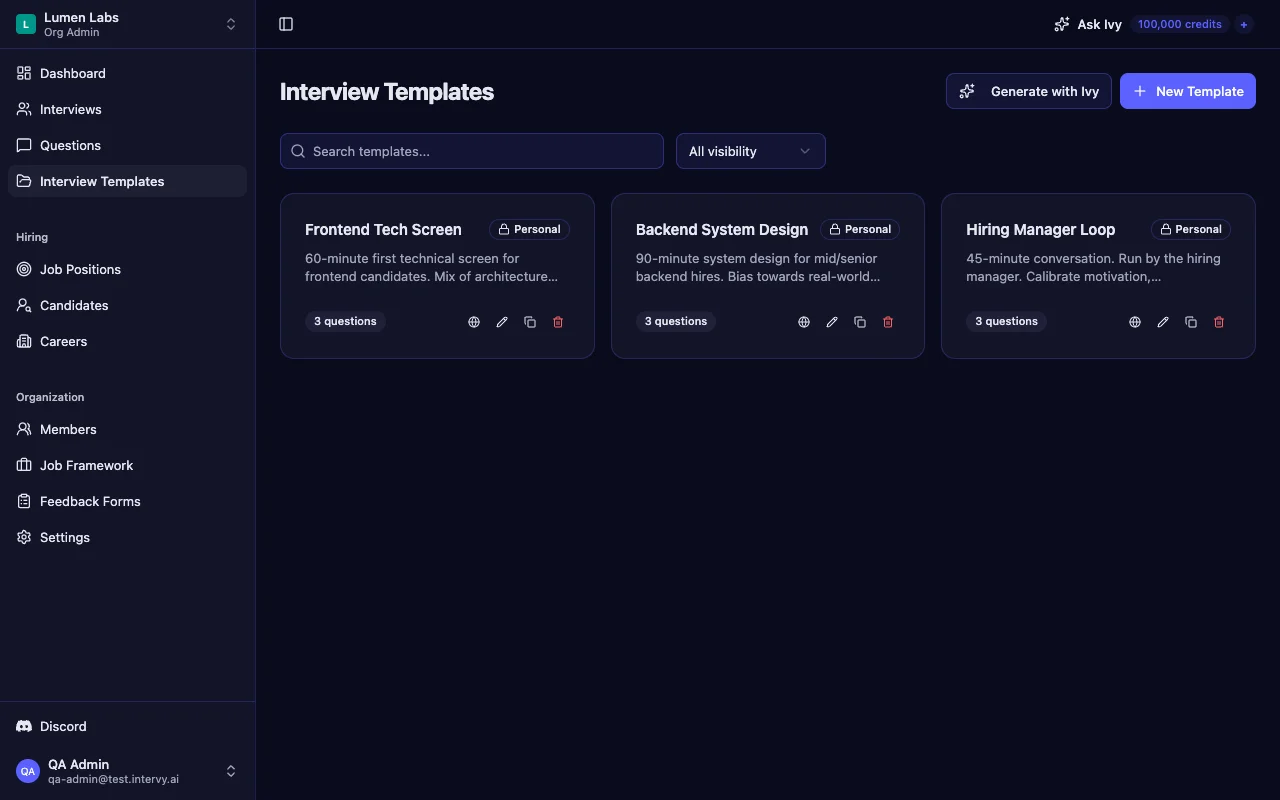
Pull the template that matches the phase. Not a fresh question set you write at 9:58 AM. The role-agnostic version is the same across functions:
- AE Discovery Screen. Sales-discovery template focused on qualification, pain-finding, and budget conversations.
- CS Lead Stakeholder Empathy. Probes escalation handling, executive-comms style, and cross-functional negotiation.
- PM Product Sense. Prioritization, tradeoff framing, and user-problem decomposition.
- EM System Design. Scopes a single architecture problem and assesses depth.
Starting an interview from a template in Intervy copies the template's questions into the new interview in one click — same order, same reference answers, same metadata. If the position phase is configured with a locked template, the system enforces it: the interviewer can't override the template at start time, which guarantees every candidate at that phase gets the same baseline question set.
Key takeaway: Pick the template, then decide which one or two questions you want to go deep on. That's the freestyle. The baseline is fixed.
If you're new to template-based hiring, the structured technical interviews guide walks through how to build a question bank and ladder questions by difficulty — same mechanics, applied to whatever function you're hiring for.
Minutes 9-12: Lock Your Scoring Rubric Before You Hear an Answer
The third checkpoint is the one experienced interviewers skip and then regret. Three minutes to decide, out loud, what a "5" looks like and what a "2" looks like for each of the questions you'll probe most heavily.
The two-sentence trick:
A 5 on this question means the candidate did X and Y unprompted. A 2 means they needed both hints to get to X.
That's it. You don't need a 12-page rubric. You need clarity on the two ends of the scale before the candidate joins the call, because once you're listening to an answer your brain will reconstruct the rubric to match the answer instead of the other way around.
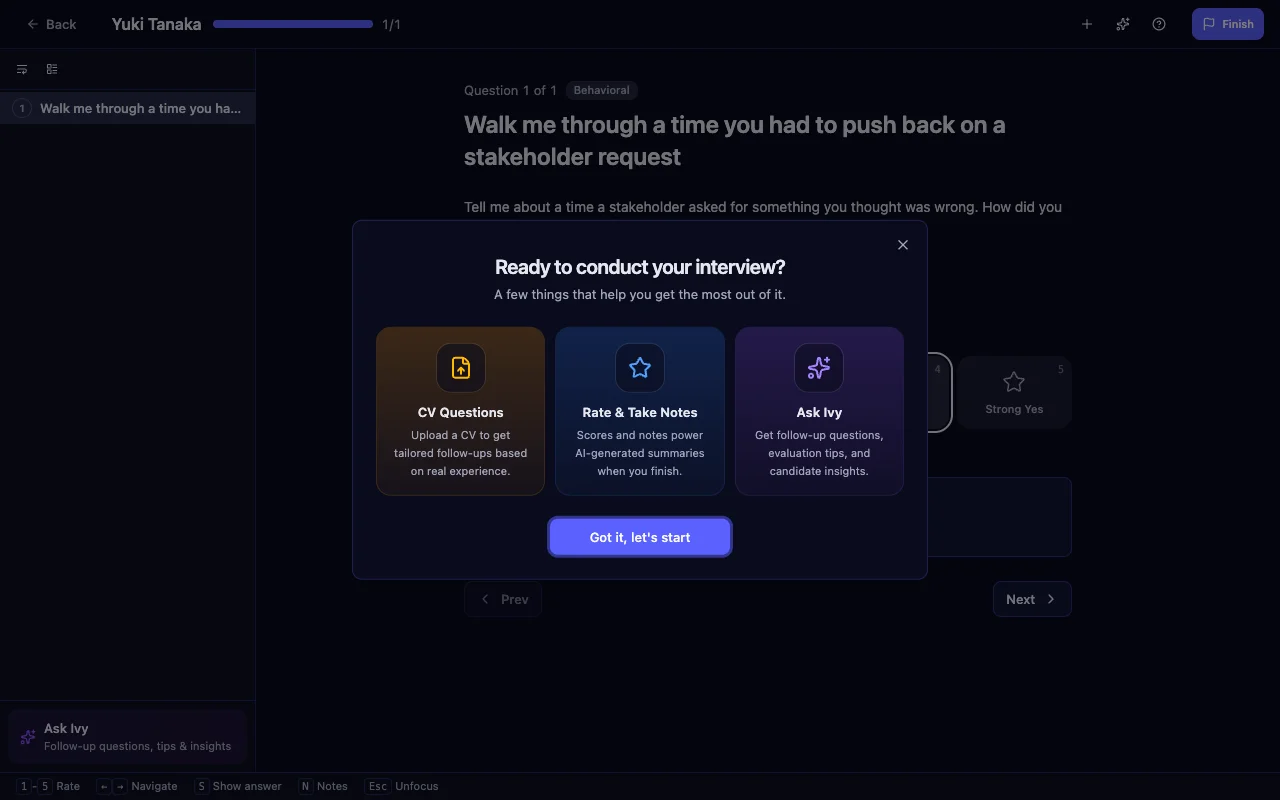
One piece of mechanics matters here. When you start an interview in Intervy, the org's scoring scale is snapshotted into that interview at start time — labels, colors, and order. If an admin edits the org scale mid-week, your in-flight interview is unaffected, so labels won't drift between candidates in the same loop.
In the conduct sidebar, each question's number badge is colored by the scoring scale, so rating an answer is a one-keystroke action that maps to the same color you set on the scale. Keep rating instantaneous — the longer it takes, the more your score is influenced by the next answer.
Tip: Rate in the moment, not in the debrief. Memory degrades fast: studies on post-interview recall consistently show that "I'll write up my scores after" produces noisier, more biased ratings than rating in real time.
Minutes 12-15: Pre-Load Two Follow-Ups from the CV
Generic follow-ups die in the interview. "Tell me more about that" gets you a paragraph the candidate has already rehearsed. Specific follow-ups, grounded in something the candidate actually wrote on their resume, get you signal.
Pick the equivalent for your function:
- Sales: "You closed a seven-figure deal at a Series-B fintech — walk me through the procurement step that almost killed it."
- CS: "You reduced logo churn 30% — what was the single decision that moved the number most?"
- PM: "You shipped a personalization feature to 50K users — what was the one metric that didn't move, and what did you learn?"
- Engineering: "You scaled the realtime service to 10x traffic — what bottleneck did you hit first, and how did you know?"
Each of these takes 30 seconds to write down, and they're impossible to half-prepare. Don't try to compose them while the candidate is on the screen — you'll lose 90 seconds typing while they're staring at your "thinking face."
In Intervy, you can ask Ivy — the AI assistant in the side panel — to draft these as CV-grounded interview questions in the prep window. They land in the interview's sidebar in a dedicated "CV Questions" group, visually separated from the template questions with a violet left border. Ivy's question generation is grounded in the candidate's anonymized profile — the profile is pre-injected into Ivy's context as a [CANDIDATE PROFILE] block — so follow-ups are tied to specific resume claims rather than generic templates.
If you want a deeper walkthrough of generating CV-specific questions, our guide to generating interview questions from a CV covers the full workflow end-to-end.
Key takeaway: Two specific CV-grounded follow-ups, pre-loaded into the sidebar, beat ten generic ones you compose on the fly.
What NOT to Do in the 15 Minutes
The routine is as much about what you skip as what you do.
- Don't read every line of the CV. Three minutes for the scan. Reading the full resume guarantees you'll run over and lose the rubric and follow-up steps.
- Don't write new questions from scratch. Pull from the bank or template. Questions written under time pressure are the lowest-signal questions you'll ask.
- Don't decide your hire/no-hire vibe before the call. Priming yourself with a verdict is the biggest source of interviewer bias. The routine is for preparing your evaluation, not pre-committing to it.
- Don't outsource judgment to AI. Ivy can draft questions and CV-grounded follow-ups. It does not tell you whether a candidate is a fit. Hiring decisions stay with you.
Tip: Five extra minutes? Don't spend them reading more of the CV. Spend them rehearsing how you'll open the call — the first two minutes set the candidate's tone and willingness to be honest.
Make the Routine Your Default
What makes this interview preparation routine work is that the shape doesn't change across roles. Sales, customer success, product, engineering — the five checkpoints are the same. The role brief differs. The CV differs. The template and the competency matrix differ. But minute 2 is always "scan, mark three." Minute 9 is always "lock the rubric." Minute 15 is always "two specific follow-ups, written down."
That repeatability is what turns the routine into a habit. After ten interviews, you won't need the clock — you'll instinctively know you haven't checked the phase guidance yet, or that you haven't decided what a 5 looks like, and you'll fix it before the call starts.
Try it on your next candidate. Open your interviews list ten minutes before the call, walk the five checkpoints, and notice how much less of the interview gets spent in catch-up mode. The structured technical interviews guide covers the broader template-and-scoring framework this routine plugs into.
Fifteen minutes. Five checkpoints. Better hires.